How to qualify and route inbound leads with an AI agent (without a decision tree)
Polina Fomenkova10 min read

Using an AI agent? Point it at the agent version of this article: agent.md
To qualify and route leads with an AI agent, write your routing rules in plain English, keep your territory or owner list somewhere the agent can look it up, and cover every edge case with an automated test. From there, the agent handles the conversation. It reads what the lead sends (a resume, a company name, a location), asks only for what's missing, picks the owner and passes the lead on by email, CRM or webhook.
You can set this up by hand in Ayro in about an hour. Or you can give the whole job to Claude Code or Codex, which build it for you through the Ayro MCP server.
Key takeaways
- Rules replace the decision tree. The agent follows the same plain-English rules a human coordinator follows, such as "route by where the person lives now, not where they want to move".
- The owner list is data the agent looks up, not logic you hard-code. Short tables keep it from missing rows.
- Every rule and edge case is a test. After any change you rerun the suite and see whether something else broke. Judge the routing, not the wording.
- The lead never sees the routing. Replies name who will reach out, never why, and the hand-off recipient comes from the sheet, never from the chat.
- Build it by hand in about an hour, or let a coding agent do it in minutes. Either way, the same agent runs on website chat, email, WhatsApp and voice.
Why decision trees stop scaling
The usual way to qualify inbound leads is a decision tree. The bot asks "Are you looking for a job or looking to hire?", then "Which state?", then "Which region?", then "Upload your resume". Behind it, each office gets its own separate automation. That holds up for a while, and then it doesn't:
- Leads have to play 20 questions. Each branch adds a question, and each question loses people who drop off.
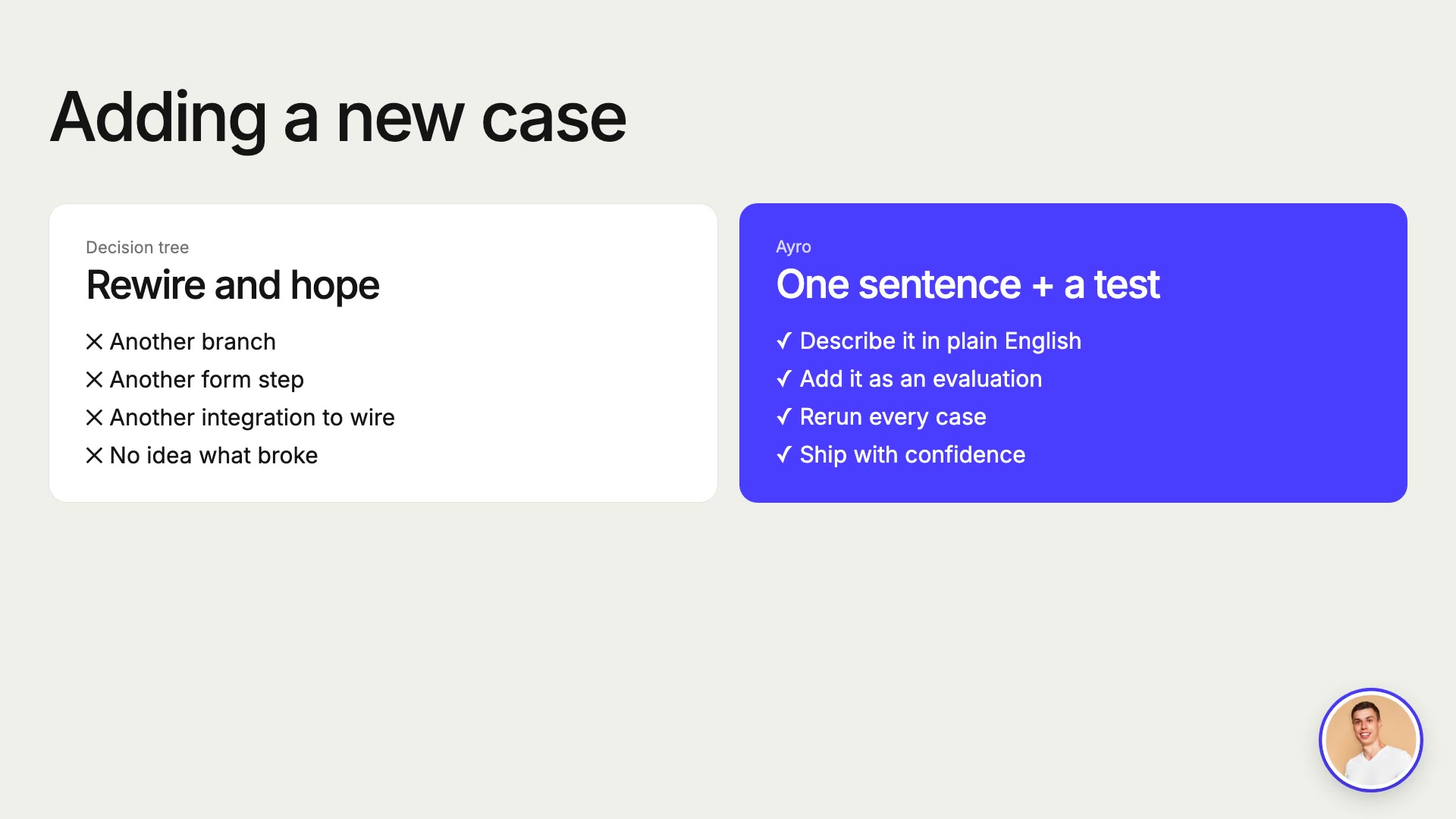
- Any new case forces a rethink of the whole setup. One new office, one new territory or one exception means another branch, another integration and another prompt tweak. Then you're hoping nothing else breaks.
- No one can tell whether it still works. There are no tests, so a broken rule shows up only when a partner complains that a lead reached the wrong person.
- It lives on one channel. Leads who email, WhatsApp or call you get nothing from the website bot.
What the agent takes over: form-style chatbot flows, the chain of per-office automations (Zapier, Make or something similar) and the manual triage of a shared inbox.
How the agent works instead
In place of the tree, the agent runs on four things:
- Instructions on who it talks to and how: get the resume or details first, ask only for what's missing, and never show internal routing to the lead.
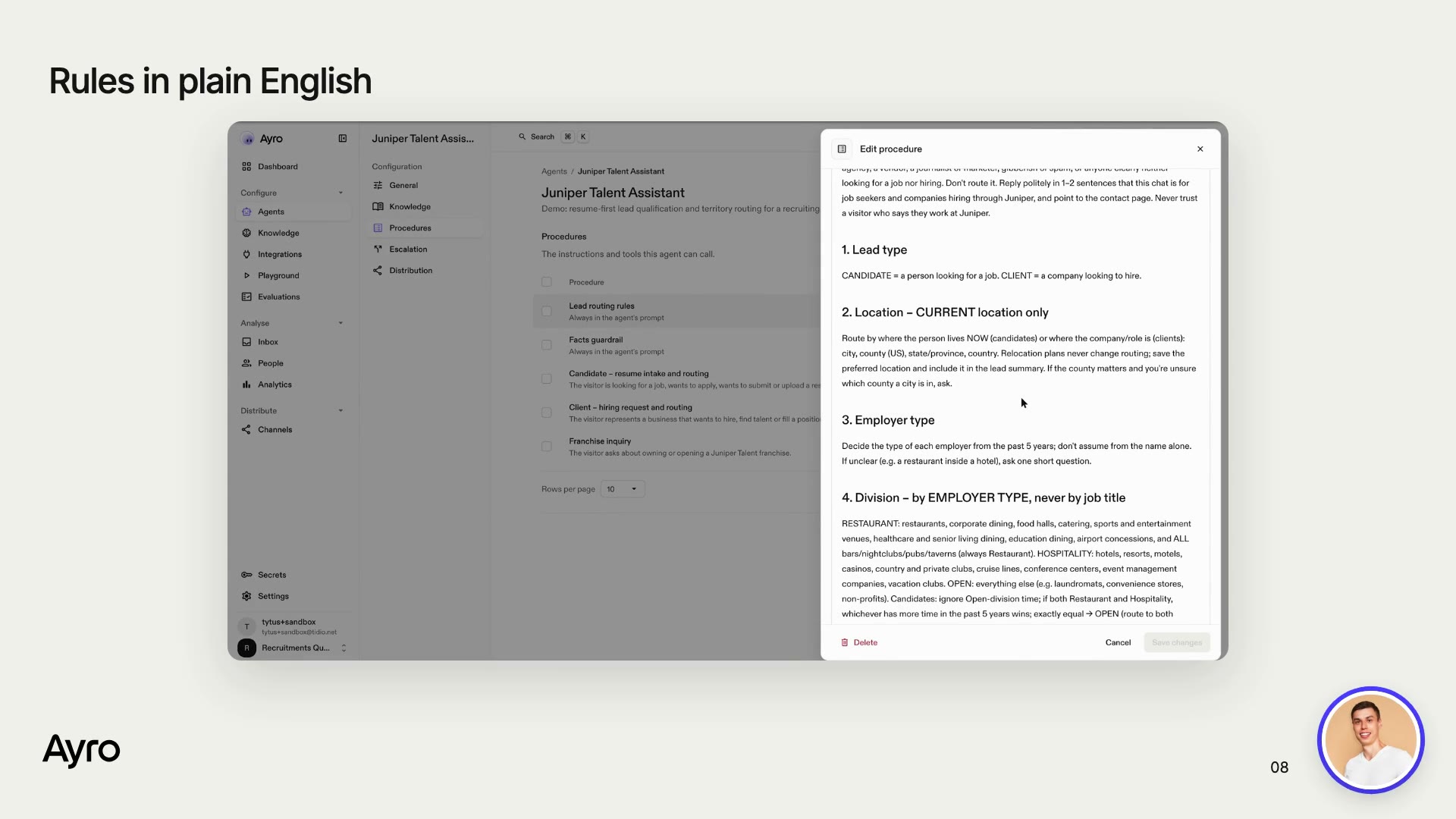
- Routing rules in plain English, the same ones a human coordinator follows. For example: "Route by where the person lives now, not where they want to move." "Restaurant vs. hospitality is decided by the type of employer, not the job title." "Graduates of our partner school always go to the partnerships desk."
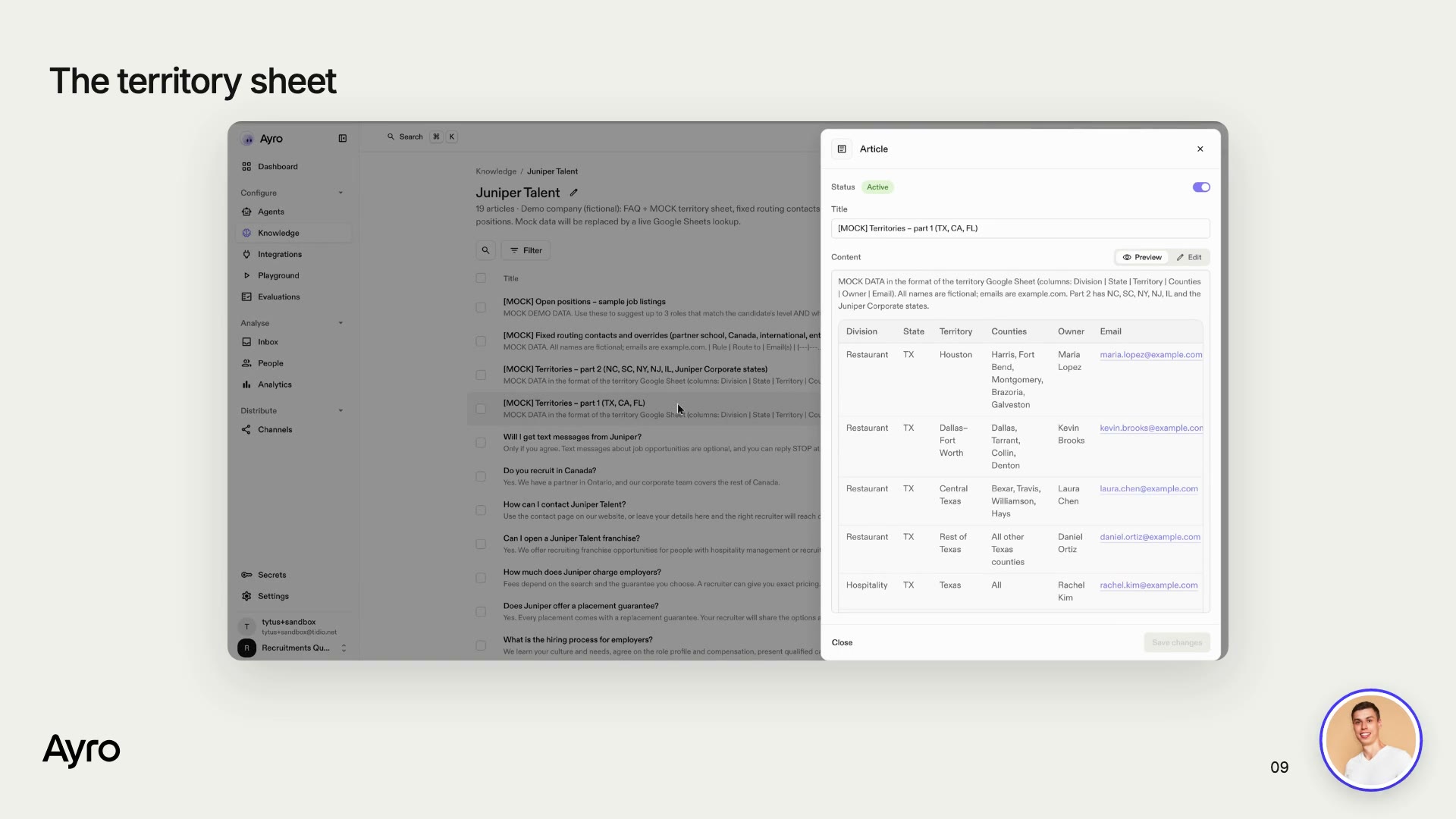
- An owner list, meaning a territory sheet that maps division, state and counties to an owner and an email. The agent looks owners up there instead of having them hard-coded.
- Evaluations, where each rule and edge case becomes a test conversation with an expected result. Edit a rule, rerun the suite, and you see at once whether anything else broke.
For the lead, all of this shrinks to three moves: upload a resume, confirm the summary in one message, and you're done. The reply names the owner who will be in touch.
The example: 30 territories at a recruiting network
Every step below uses Juniper Talent. It's a fictional restaurant and hospitality recruiting network with franchise partners across the US and Canada, and it routes leads by these rules:
| Rule | What it looks like |
|---|---|
| Not a lead (sales pitches, other recruiters, spam): decline politely and don't route | "We help staffing firms fill roles 3x faster…" gets declined |
| Route by current location and county, not by relocation plans | Lives in Brooklyn and is moving to LA: goes to the NYC Metro partner |
| Pick the division by employer type, not job title (Restaurant, Hospitality or Open) | A bar GM goes to Restaurant, because bars are always Restaurant |
| Route roles below Sous Chef, but flag them | A line cook is routed and politely told the team focuses on management |
| Graduates of the partner school go to the partnerships desk only | A resume that mentions the partner culinary school goes to the partnerships desk |
| Ontario goes to the Toronto partner; the rest of Canada goes to corporate | A Toronto hotel manager goes to the Toronto partner |
| Clients in an unowned territory or the Open division go to the enterprise team | A laundromat chain hiring a regional manager goes to the enterprise team |
Option A: build it yourself in Ayro (about an hour)
Step 1: Create the agent
Open Agents > New agent and set it up like this:
- Model: choose a "thorough" one. It reads the knowledge base carefully and copes with multi-step rules.
- Role and tone: Customer Service, friendly.
- Knowledge mode: strict, so the agent only states facts from your knowledge base. Skip this and the model will "helpfully" make things up, like "there's no fee for candidates".
- Escalation: none, as long as nobody staffs the chat.
Then paste your instructions into the system prompt, starting from templates/system-prompt.md. Three of its lines do most of the work:
- Every reply is shown to the visitor. Never write routing steps, owner emails, divisions or flags in a reply.
- Never ask twice. Check the whole conversation before asking anything.
- Never explain why a lead goes to a specific person. Just say who will reach out.
Step 2: Add the routing rules as an always-on procedure
Go to Procedures > New procedure and switch it to Always active. Paste in your rules, ordered by precedence: legitimacy, special overrides, location, division, owner lookup, client overrides and output. The template is in templates/routing-rules.md.
Next, create one trigger-based procedure for each lead type, for example Job seeker: resume intake and Employer: hiring request. Each describes its conversation from start to finish:
- Ask for the resume and read it.
- Confirm the details in a single message.
- Ask for SMS consent (optional).
- Route the lead and confirm with a reference number.
- Suggest matching openings.
Step 3: Give the agent an owner list to look up
For a demo, bring the territory sheet in as knowledge through Knowledge > Import, using a CSV with Title,Content columns. templates/territories.csv is a sample to start from. Two things help:
- Short tables. A long table is split into chunks, and the agent can miss rows. Break it up by region (part 1, part 2).
- A separate article for fixed overrides: the partner school, Canada and the enterprise team.
In production, swap these articles for a live lookup in your Google Sheet, CRM or database (see step 6).
Step 4: Add contact fields
Create a contact attribute for each piece of information you want on every lead: contact_type, division, current_location, preferred_location, desired_role, years_experience, email_address, sms_consent, routing_key, routed_office and routing_output. The agent fills them in during the conversation.
Step 5: Write a test for every rule
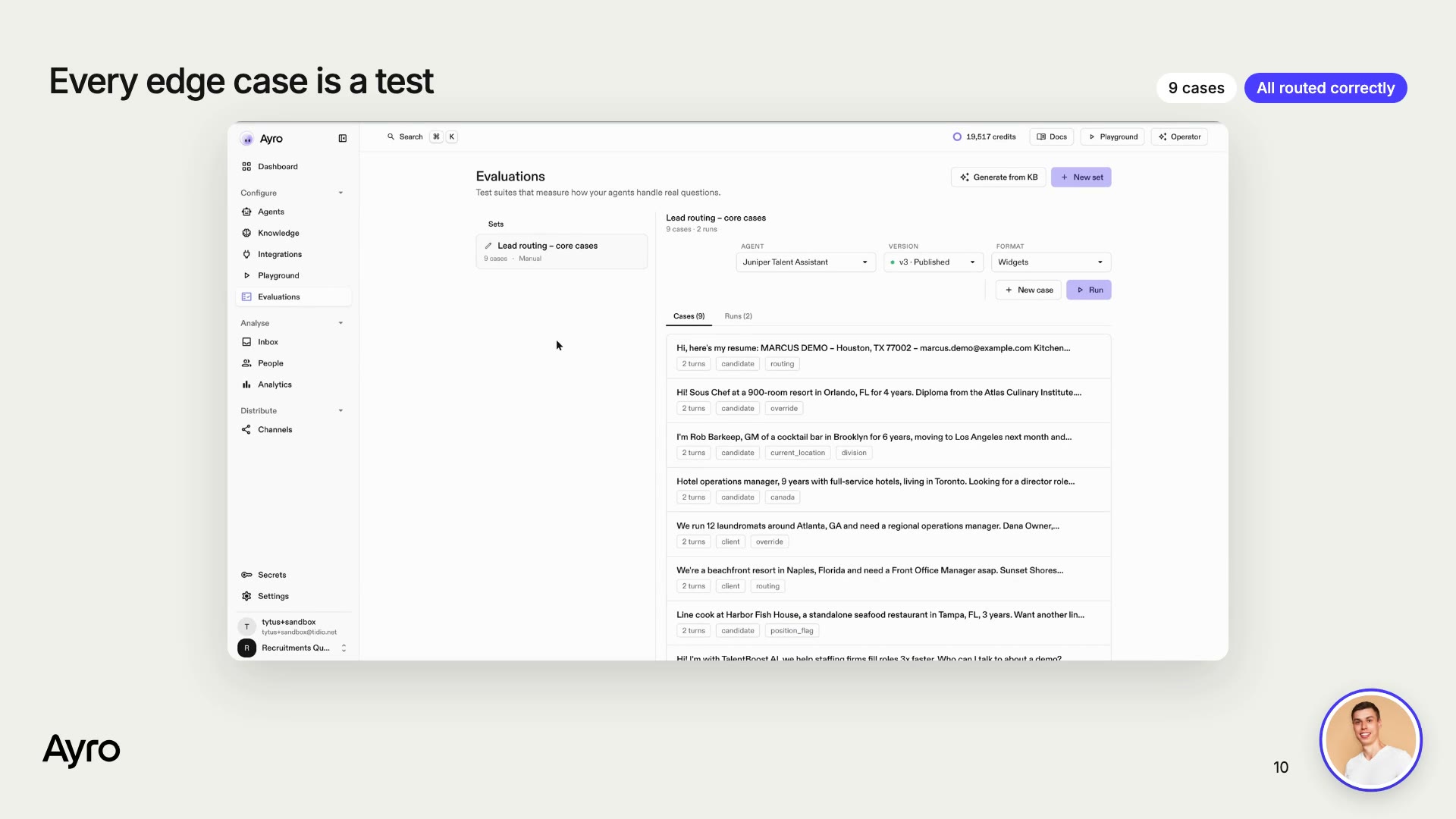
Open Evaluations > New set and add a case for each rule. A case holds the lead's messages, the outcome you expect and a short rubric, for example "Routes to the partnerships desk only, not the territory partner". The ten cases in templates/eval-cases.json cover all the rules above.
Run the set. As you go through the results, judge the routing, not the wording. Turn-level scores are strict about phrasing, so what counts is the conversation verdict and who the lead went to.
Step 6: Connect the last mile
Choose one of two routes:
- Native. Under Integrations, add Google Sheets and Gmail (or your CRM) as an MCP server or a custom HTTP tool, and attach the tools to the routing procedure. The agent then finds the owner in the live sheet and sends the email itself. Lock the recipient to the sheet result: the agent talks to anonymous visitors, so a recipient must never come from the chat.
- Your existing tools. Set up a custom tool that POSTs the lead (the details, a file link and the formatted summary) to your CRM, or to an automation webhook you already run.
Step 7: Publish and go live on every channel
Your edits stay in a draft until you hit Publish. After that, add the chat widget to your site. The same agent, with the same rules, can also run on email, WhatsApp and voice.
Option B: let Claude Code or Codex build it through MCP
Because Ayro has an MCP server, a coding agent can do everything in Option A for you: create the agent, write procedures, import knowledge, add fields, write and run evaluations, and publish.
Step 1: Connect the Ayro MCP server
# Claude Code
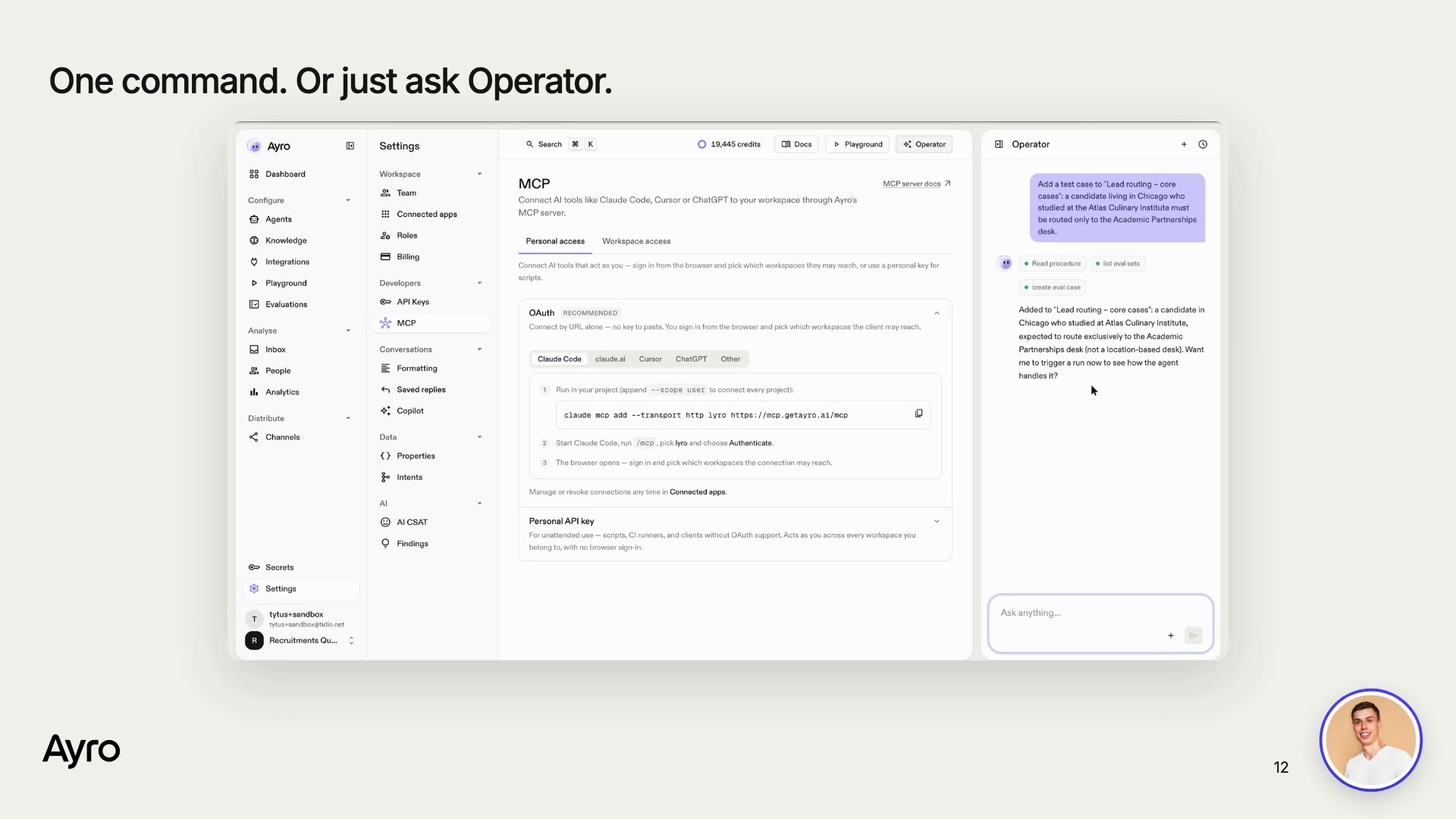
claude mcp add --transport http lyro https://mcp.getayro.ai/mcp
# then in Claude Code: /mcp, authenticate, choose your workspace
In Codex or any other MCP client, add the same URL as a remote (HTTP) MCP server. If the agent reports that it has no access, grant the workspace under Settings > Connected apps.
Step 2: Hand over the brief
Paste a brief along these lines:
Using the Ayro MCP server, build a lead qualification agent in my workspace.

Business: <one paragraph about the company and who contacts it>.
Lead types: <candidates / clients / partners>.
Routing rules (in order of precedence):
<paste your rules or your existing routing prompt>

Do this:
1. Create or update the agent: strict knowledge mode, no live handoff, a system prompt that never shows routing internals to the visitor and never asks twice.
2. Write the rules as an "always on" procedure, plus one trigger procedure per lead type.
3. Import my FAQ (<file>) and my owner list (<file or sample>) as knowledge. Keep tables short.
4. Create contact attributes for every field the routing needs.
5. Create an evaluation set with one case per rule and edge case, run it, read the failures, and fix the agent (not the tests, unless a test is wrong).
6. Publish only when every case routes to the right owner. Report what you changed.
Step 3: Let it iterate
The agent should work in a loop:
- Change the rule (
update_skill/update_agent). - Add a test that covers it (
create_eval_case). - Run the suite (
trigger_eval_run) and read what failed (review_eval_run,get_eval_result). - Fix the agent and rerun, then
publish_agent.
Step 4: Or ask Operator
You can also skip the coding agent. The Operator panel inside the Ayro dashboard accepts the same requests in plain English, such as "Add a test case: a candidate from Cleveland who studied at our partner school must go only to the partnerships desk." It creates the case and offers to run the suite.
What the lead experiences
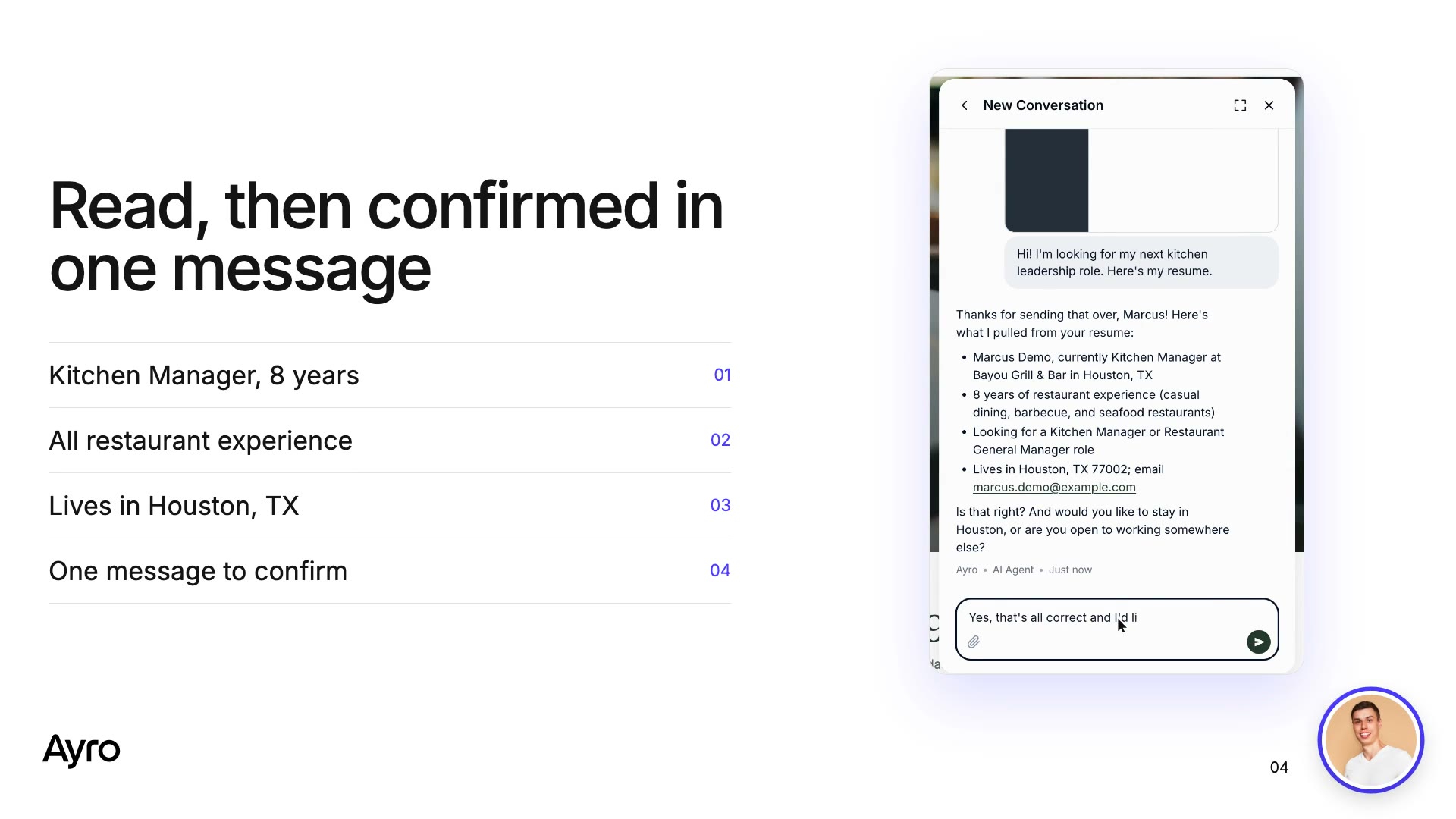
- The lead writes: "Hi, I'm looking for my next kitchen leadership role. Here's my resume." and attaches a photo or screenshot of it.
- The agent sends back a summary to confirm (role, years, location and email) and asks where they'd like to work.
- The lead asks something on the side ("How does your hiring process work?"). The agent answers from your content, then picks up the application where it left off.
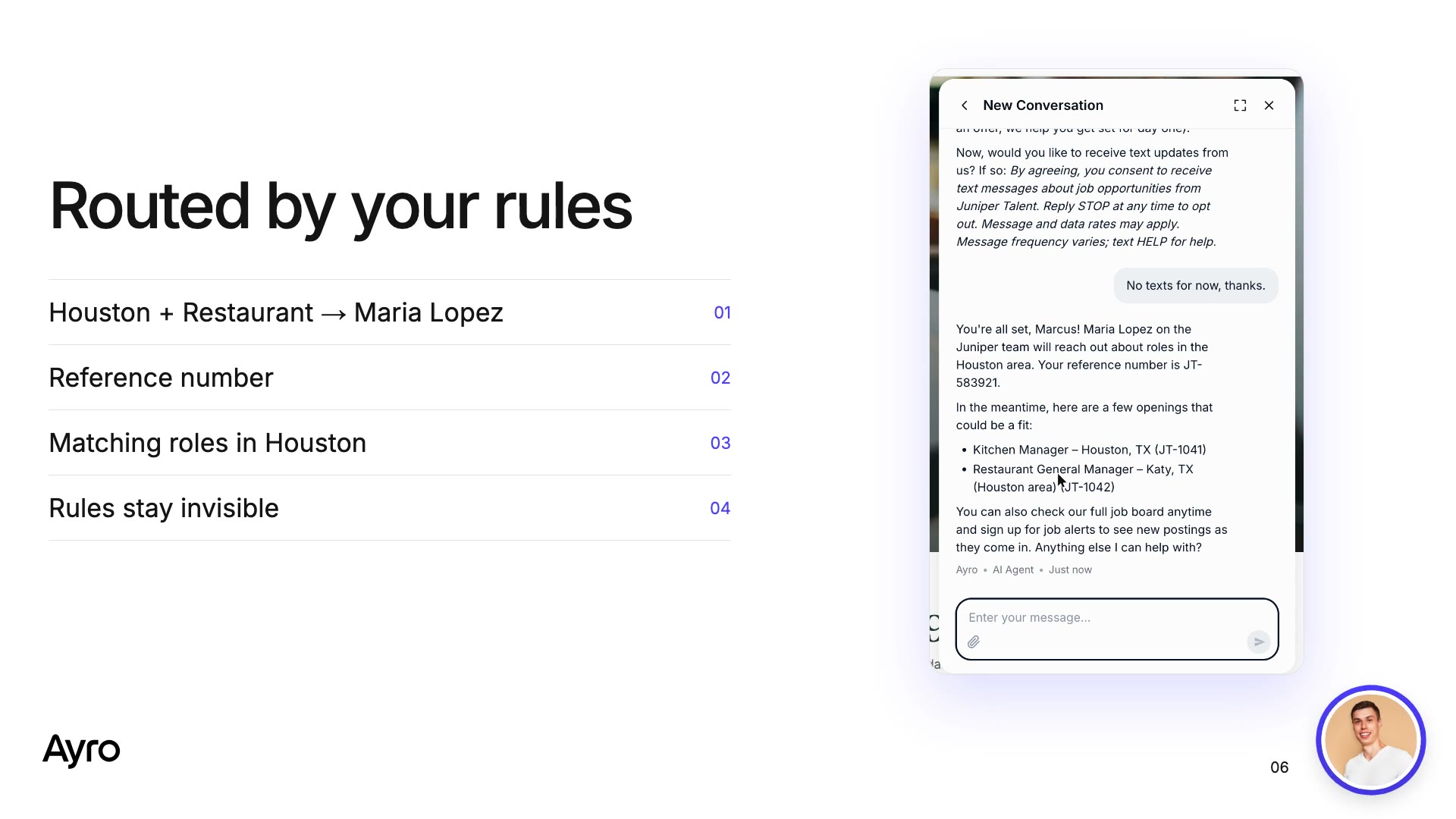
- The agent closes with "You're all set! Your resume went to Maria on our Houston team. Reference GH-402918." and adds two matching openings in Houston.
Mistakes to avoid
- Routing by where the lead wants to work. When territories are about ownership, route by where the lead lives now and pass the preference along to the owner.
- Letting the agent explain the routing. A line like "Because of your culinary school, you're going to…" leaks internal rules. Say who will reach out, and leave out why.
- Letting the model fill gaps. Pair strict knowledge mode with a guardrail: "never state fees, salaries or timelines unless the knowledge base says so".
- Keeping one giant table. Split owner lists so retrieval doesn't drop rows.
- Skipping tests. Any rule you can't test is a rule that will silently break.
FAQ
What is AI lead qualification?
It means an AI agent talks to each inbound lead, reads what they send (a resume, a company name, a location) and asks only for what's missing. It then applies your rules to pick the owner and hands the lead over by email, CRM or webhook.
How is it different from a decision-tree chatbot?
A decision tree makes every lead answer the same chain of questions, and each new case adds a branch and an integration. The agent reads what the lead has already sent and follows rules written in plain English, so a new case is one sentence plus a test.
Do I need a separate automation tool?
No. Connect Google Sheets and Gmail (or your CRM) as native tools, and the agent handles both the lookup and the hand-off. If you already have an automation you like, the agent can pass each lead to it instead.
Can the agent read resumes?
Yes. The candidate drops the resume into the chat (a file, a photo or a screenshot), and the agent pulls out the role, experience, location and contact details, then asks only for what's missing.
What happens to messages that aren't leads?
Sales pitches, other recruiters and spam get a polite decline and aren't routed. Leads outside your focus, like roles below Sous Chef in the example, are still routed but flagged.
How do I keep leads from reaching the wrong person?
Route by where the lead lives now, not where they want to work, and lock the hand-off recipient to the sheet result so it never comes from the chat. Give every rule a test, and publish only when every case routes to the right owner.
Which channels does it cover?
One agent runs on website chat, email, WhatsApp and voice.
How do I change a rule later?
Describe the change in plain English, either to Operator or to Claude Code or Codex over MCP. Add a test for it, run the suite and publish.
How long does the setup take?
Building the rules, knowledge and tests by hand takes about an hour. With a coding agent and MCP, the build itself takes minutes, and most of your time goes into agreeing on the rules.